
What is WPTravelly, and how does it make tour bookings easy on WordPress?
WPTravelly is a user-friendly tour booking plugin WordPress by MagePeople, paired with WooCommerce, that enables tour operators, travel agencies, or bloggers like you to create and manage tour packages with ease.
The free version offers features such as easy payments, Google Maps, and a mobile-friendly, SEO-ready setup. The Pro version adds awesome extras like PDF tickets, recurring tours, and booking reports. You can set up a booking site in under five minutes, and it won’t slow your site down—perfect for stress-free tour management!
Why WPTravelly is a Game-Changer
Imagine you want to sell awesome tour packages, take payments smoothly, and keep everything organized without a million tools. WPTravelly’s got you covered! It works with any WooCommerce-friendly theme, handles payments like PayPal or Stripe, and looks great on phones. Plus, it’s SEO-ready and supports multiple languages.
WP Hive says it uses less memory than 99% of plugins and keeps your site speedy. With 57,438 downloads and 1,000 active installs by August 2025, it’s a trusted pick for travel businesses. From quick day trips to week-long adventures, WPTravelly makes it all simple.
Why you’ll love it: If you’re fed up with manual bookings and messy systems, WPTravelly’s automation and easy setup are exactly what you need. It’s like having a travel assistant running your site!
How to Set Up WPTravelly in a Snap
Don’t worry, setting up is a piece of cake! Here’s how to get going:
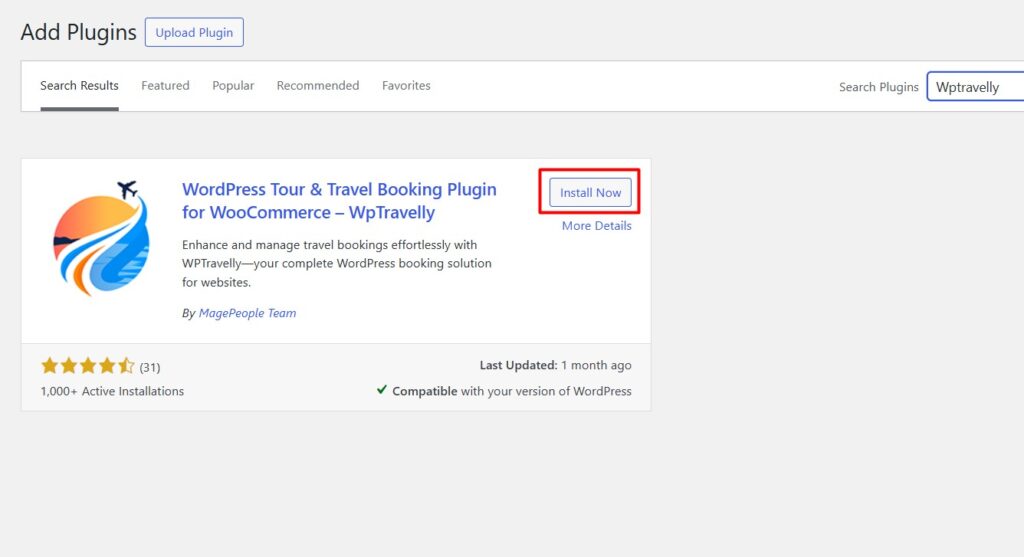
- Grab the Free Version: In your WordPress dashboard, go to Plugins > Add New, search “WpTravelly – Tour & Travel Booking Manager for WooCommerce,” hit Install Now, and activate it.
- Get WooCommerce Ready: WPTravelly needs WooCommerce for payments, so install and activate it first (it’ll prompt you if needed).
- Want More Features? Go Pro (Optional): For fancy stuff like PDF tickets, buy the WpTravelly Pro version from the official site, download the ZIP, upload it via Plugins > Add New > Upload Plugin, activate, and pop in your license key under Settings > License. Keep the free version and WooCommerce active.
- Quick Setup: Head to Travel > Settings in your dashboard. Pick your currency (through WooCommerce), set tour categories, and tweak email notifications. WPTravelly can even create pages like Tour List for you.
Hot tip: Check out the tutorial video on the plugin page for a quick visual guide. It’s tested with WordPress 6.8.1 and PHP 8.1.12—no errors, just smooth sailing!
Creating Your First Tour—So Fun!
Making a tour package is like planning a dream trip, and WPTravelly makes it a blast. Here’s how:
- Start a New Tour: Go to Travel > Add New Travel. Give it a fun name like “Bali Beach Blast” and write a short, exciting description.
- Add the Details:
- Basics: Set the duration, price, max guests, age range, starting point, and location (you can add new locations easily).
- Dates: Pick fixed, recurring, or custom dates. Set start/end times or repeat weekly (recurring is Pro-only).
- Pricing: Add ticket types (like adult or kid), set prices, and choose icons. You can tweak more with advanced options.
- Forms: Use the default form or customize what info you need from travelers.
- Extras: Offer add-ons like airport pickups or a sunset dinner with prices.
- Photos & Features: Upload cool images, list what’s included (or not), add activities, places to visit, and a day-by-day plan.
- FAQs & More: Add quick FAQs, contact info, or reasons to book with you.
- Go Live: Choose categories, add a featured image, pick a template, and hit Publish. Preview it to see your tour shine!
And just like that, your tour is ready for bookings! Customers can pick dates, book, and pay through WooCommerce—easy peasy.
To learn more, check out how you can build a personalized travel booking website in 30 minutes.
Handling Bookings Like a Boss
When bookings start coming in, WPTravelly keeps things organized:
- Check Bookings: See all orders in WooCommerce—filter by status, customer, or date. View guest details and itineraries.
- Track Spots: It auto-updates how many spots are left for each tour.
- Reports & Exports (Pro): Download guest lists as CSV files or get detailed booking stats.
- Emails: Send automatic confirmations and get notified about new bookings. Customize emails in Pro.
- Offline Bookings: Use the Backend Order add-on for manual bookings.
Got a glitch, like a filter not working? Clear your site’s cache or check the support forums for quick fixes.
Free vs. Pro: What’s the Deal?
The free version of WPTravelly is awesome, but the Pro takes it up a notch. Here’s a simple breakdown:
| Feature | Free Version | Pro Version |
| Payments | Works with all WooCommerce gateways | Same, plus slick automation |
| Tour Setup | Unlimited tours, tickets, Google Maps, itineraries | All free + recurring tours, better inventory |
| Bookings & Emails | Basic tracking via WooCommerce | Custom forms, PDF tickets, auto-emails, CSV exports |
| Display Options | Grid/list views, search forms | Fancier templates, better filters |
| Add-ons | Basic support | Full add-on support (seat plans, discounts, etc.) |
| Help | Community forums | Fast priority support |
The free version is perfect to start—SEO-ready, mobile-friendly, and multilingual. Pro adds cool stuff like PDF tickets and recurring tours for pros.
Fancy Tweaks and Tricks
Make WPTravelly your own with these easy tweaks:
- General Settings: In Travel > Settings, set default locations, features, or display styles.
- Shortcodes: Use [travel-list style='grid' column=3] for a grid look or [ttbm-top-search] for a search bar. Pop them anywhere on your site.
- Templates: Pick styles like Viator or Default for tour pages.
- Add-ons (Pro): Try Seasonal Pricing for date-based rates or QR Check-ins for easy check-ins.
- SEO & NLP Boost: Use keywords like “top Bali tours” in your descriptions. Clear headings help AI search tools (AIO/LEP) love your content.
Cool Add-ons and Tips
Level up with these add-ons:
- Backend Order: Add bookings manually from your dashboard.
- Seat Plan: Let customers pick their seats.
- Early Bird Pricing: Offer discounts for early bookers.
- Seasonal Pricing Addon: offering different prices based on different ranges.
- Group Ticket Qty: Allows travel agents to offer discounted prices for group ticket buyers.
- Group Pricing or Bulk Pricing: a good solution for selling tour group tickets to increase sales.
- QR Code Addon for Tour Plugin: This will validate the live ticket, and the QR code will be displayed on the PDF ticket.
Smart moves:
- Test your booking process to catch any hiccups.
- Use awesome photos for your galleries.
- Check mobile display—WPTravelly’s responsive, but confirm it’s fast.
- Get customer reviews via WooCommerce for trust (big SEO win).
- Fix issues: Clear cache for shortcode problems; keep plugins updated.
Frequently Asked Questions (FAQs)
Got questions? We’ve got answers! Here’s what people often ask about WPTravelly:
1. Do I need WooCommerce for WPTravelly?
2. Will it work with my WordPress theme?
3. What’s different in Free vs. Pro?
4. How do I make recurring tours?
5. Can I give discounts or seasonal prices?
6. How do I show tours on my site?
7. What if shortcodes don’t work?
8. Can I send PDF tickets?
9. Is WPTravelly good for SEO?
10. How do I get help?
Let’s Get Your Tour Site Rolling!
It’s your no-stress guide to WPTravelly, backed by solid stats like 57,438 downloads and a 4.8/5 rating. It’s easy, powerful, and grows with your travel biz. Start for free, play around, and upgrade to Pro when you’re ready. Got questions? Our support forums and Pro tickets have your back. Now go build that awesome tour site and watch bookings soar. Happy travels!
